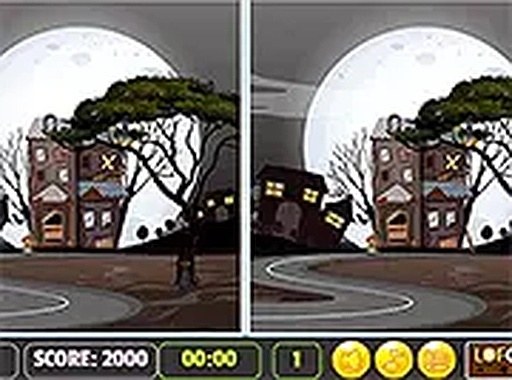
Halloween Spot the Difference Puzzle
Review
Halloween Spot the Difference Puzzle delivers exactly what its name suggests: two similar Halloween house photos, five differences per level, and a countdown timer. The family-friendly theme avoids frightening imagery, making it accessible to younger players. Its browser-based design means no downloads, and the game works on both mobile and desktop. The main limitation is repetition—once you learn where differences tend to hide, the challenge may fade. Still, it is a solid choice for short, focused sessions.
About This Game
Comparing Images Under Time Pressure
Two photos of Halloween houses appear side by side. Your task is to find five differences in the first image by clicking or tapping the spot where it diverges from the second. Differences can be missing decorations, changed colors, or absent objects. A timer counts down, so you must work quickly without losing accuracy. The challenge comes from the small scale of the changes and the need to scan efficiently.Where Differences Tend to Hide
Windows, doors, pumpkins, and other decorations are common places for changes. A pumpkin might be missing, a window color might shift, or an object might disappear entirely. Because the differences are subtle, a systematic scan—top to bottom or left to right—often works better than random looking. Staring at one area for too long wastes time; moving on and returning later can reveal what you missed.Designed for Quick, Family-Friendly Sessions
Each level contains exactly five differences, and the timer adds urgency without becoming punishing. The Halloween theme uses friendly imagery rather than frightening content, so it suits younger players and mixed-age groups. The game runs in a browser on both mobile and desktop, requires no downloads, and is free to play. A full-screen mode is available for a larger view, which can make small details easier to spot.Practical Tips for Faster Finds
Practice scanning in a consistent pattern rather than jumping around. Pay close attention to windows, doors, and decorations, since those areas change most often. If you get stuck, compare the two photos side by side and look for anything that seems out of place. Short breaks can help maintain focus during longer sessions, and regular play gradually sharpens observation speed.Editorial Notes
✅ Compatibility & Testing
• Desktop (Windows 11, macOS Ventura)
• Mobile (iPhone 14, Samsung Galaxy S23)
• Tablet (iPad Pro, Android tablet)
✅Supported browsers: Chrome, Safari, Edge, Firefox (latest versions)
❌ Not supported: Internet Explorer, older browser versions
Faq
How many differences do I need to find in each level of Halloween Spot the Difference Puzzle?
Every level contains exactly five differences. You must find all five in the first photo before the timer reaches zero. The game tracks your progress as you click each one, so you always know how many remain. Missing even one difference means the level is not complete.
Can I play Halloween Spot the Difference Puzzle on my phone?
Yes. The game runs directly in a browser on both mobile devices and desktop computers. It does not require any download or installation. On a phone, you tap the screen instead of clicking with a mouse, and the layout adjusts to fit the smaller display.
What should I do if I get stuck on a level?
Try scanning the images systematically from top to bottom or left to right. Focus on windows, doors, pumpkins, and other decorations, as these are common spots for changes. Comparing the two photos side by side can also help you notice a missing object or a shifted color.
Is Halloween Spot the Difference Puzzle suitable for children?
The game uses a Halloween theme with friendly imagery and no frightening content. It is designed to be suitable for all ages, making it a reasonable choice for family play. The observation challenge is simple to understand, though finding all five differences under time pressure still requires focus.
Does Halloween Spot the Difference Puzzle cost anything to play?
No. The game is completely free to play in your browser. There are no downloads, installations, or in-game purchases mentioned. You can open it on a mobile device or desktop computer and start playing immediately without creating an account.
What kind of differences appear between the two Halloween house photos?
Differences can include missing decorations, color changes on windows or other objects, and absent items such as a pumpkin. The changes are subtle and placed in various parts of the scene. Because they are small, careful comparison rather than quick glancing usually works best.




💬 Comments
0 comments